
BVA is proud to introduce new digital membership cards. Digital cards provide a more flexible and environmentally friendly option for members. Should you have any questions regarding this new membership card format, please contact membership@bva.org or call (800) 669-7079.
Digital membership cards are available for both iPhone and Android. Please allow two weeks after submitting application before downloading. Below are the instructions to download your digital membership card to your smart phones.
To download your digital membership card use this link on your phone or click the button below. If you are on a desktop, you may scan the following QR code with your phone.
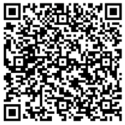
To access your account
Please use the following steps:
Step 1: Enter your email, phone number or membership number into the first field and last name into the second field. Your email will work in lieu of your membership number.
Step 2: Select “Add” to open the card in your wallet to place your membership card in your wallet.
Step 3: Select add one more time to add to your wallet.
* If your phone or email address doesn’t work we may not have your current contact information. Please update your contact information (phone number, email, and address) on BVA.org. The form can be found here. Please allow 3-5 days for your updates to be processed.
Downloading the eMembership Application
This app will allow you full capability of your membership benefits and any other special offers available to you as a member. This can be downloaded now or at a future date with the following steps:
Step 1: Download the eMembership app by clicking the button below for your phone (iPhone or Android).
Step 2: Click the app to open it.
Step 3: Select the Blinded Veterans Association tile and touch “Find My Membership Cards.”
Step 4: Enter your email and last name, or phone number* and last name.
*Please note that if you search by phone number and have multiple numbers in our system, only the number we have noted as “primary” will work.